Quick actions
Merge tasks (web/desktop)
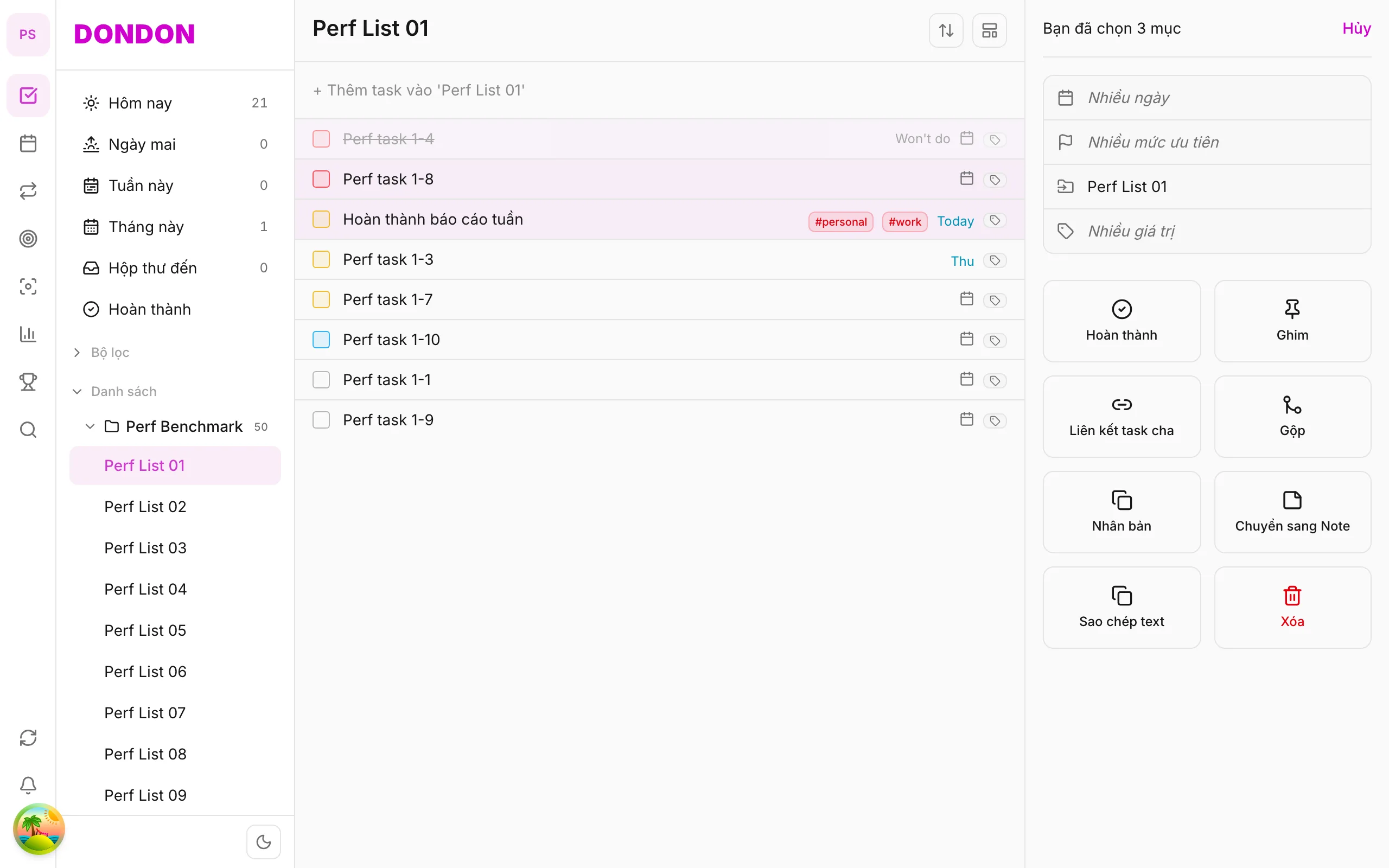
Merge duplicate tasks from bulk pane on web/desktop — not available on mobile yet.
Free
On mobile: Task merge not available. Use Duplicate or edit description in Task detail.
What you’ll learn (web/desktop)
- Select ≥ 2 tasks to merge
- Use Merge in bulk pane
- Pick survivor task
Before you start
| Platforms | Web · Desktop |
| Plan | Free |
Steps (web/desktop)
1. Select duplicates
⌘/Ctrl + click ≥ 2 tasks to combine.
2. Open bulk pane
Pane shows selection count on the right.
3. Tap Merge
Confirm dialog — pick task to keep.
4. Verify result
One task remains; others removed.
Related guides
Try DonDon on your phone
Use the app for single tasks — merge coming to mobile. Sign up free.
Frequently asked questions
- Is merge on mobile?
- **Not yet** — web/desktop only. On mobile: [delete](/en/guides/delete-task/) extras or merge content manually in Task detail.
- Merge vs duplicate?
- Merge removes extras; duplicate creates copies.
- Subtasks when merging?
- Check preview — child relations may change.
Create a free account and start managing tasks today.
Smart task management — focus on what matters.
Create free account