Quick actions
Bulk edit tasks (web/desktop)
Select multiple tasks and bulk edit on web/desktop — not on mobile yet; edit one task via Task detail on the app.
Free
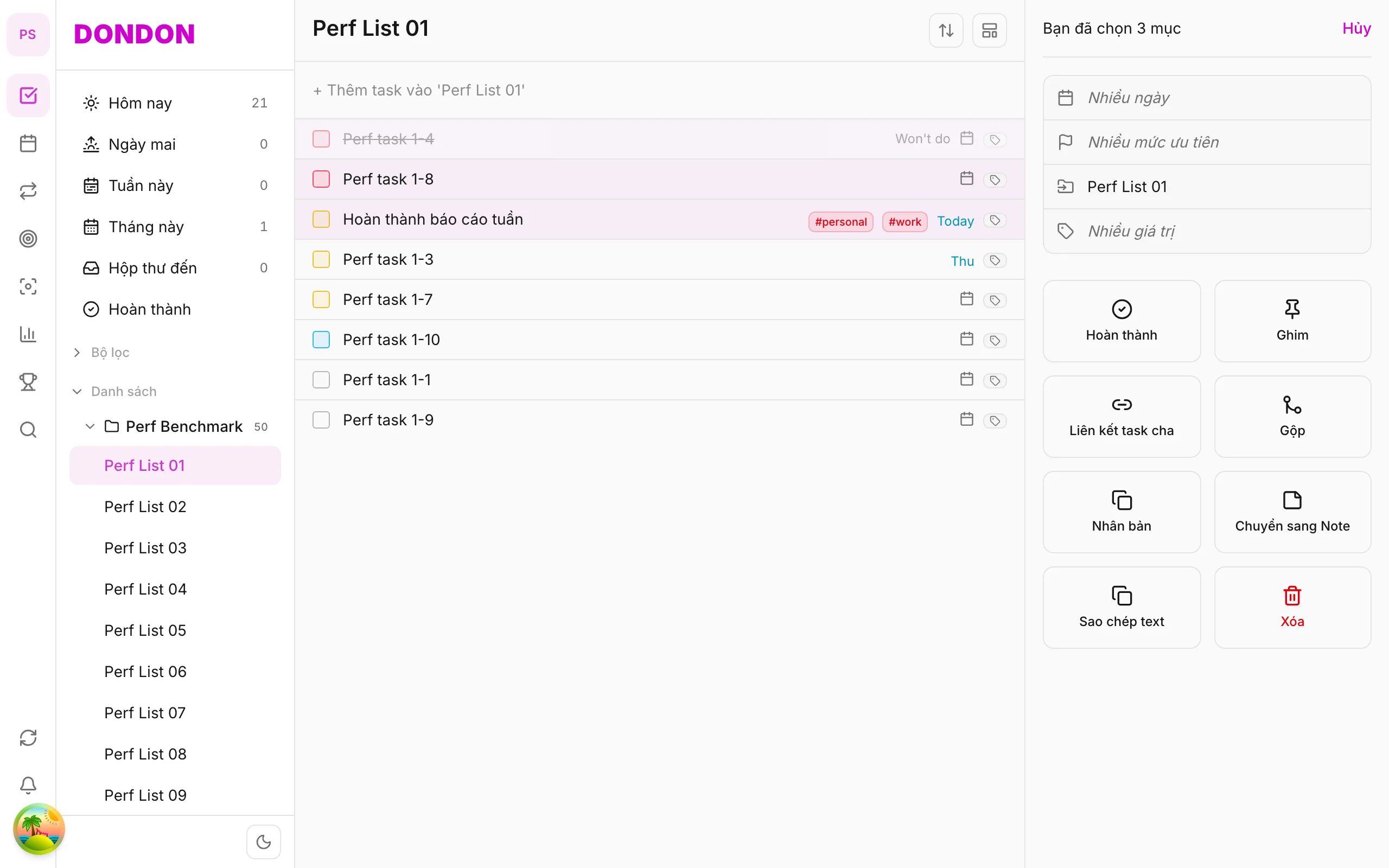
On mobile (iOS/Android): Bulk edit not available. Edit one task: tap → Task detail → change date, priority, tags. Or long-press per task for single actions.
What you’ll learn (web/desktop)
- Select multiple tasks with ⌘/Ctrl + click
- Open You selected N items pane
- Batch edit date, priority, tags
Before you start
| Platforms | Web · Desktop — primary for bulk edit. Mobile: see disclaimer above. |
| Plan | Free |
| Prerequisites | Mouse + keyboard; Tasks on web/desktop. |
Steps (web/desktop)
1. Select tasks
⌘/Ctrl + click each row — or Shift + click for a range.
2. Open bulk pane
Right pane shows You selected N items with Date, Priority, Tags.
3. Edit fields
Click field → pick new value — applies to all selected tasks.
4. Clear selection
Click empty area or Escape to close pane.
Mobile alternative
- Priority, Due date, Tags — per task
- Long-press menu for quick single actions
Related guides
- Merge tasks (web/desktop)
- Bulk complete (web/desktop)
- Help Center
Try DonDon on your phone
Bulk edit coming to mobile — use the app for single tasks today. Sign up free.
Frequently asked questions
- Is bulk edit on iPhone/Android?
- **Not yet** — multi-select and bulk pane are web/desktop only. On mobile: edit each task in **Task detail**.
- Select all in a list?
- On web: view select-all shortcut or Shift + click range.
- Mixed values across tasks?
- Pane shows **Multiple values** — pick new value to overwrite all.
Create a free account and start managing tasks today.
Smart task management — focus on what matters.
Create free account