Quick actions
Merge tasks (web/desktop)
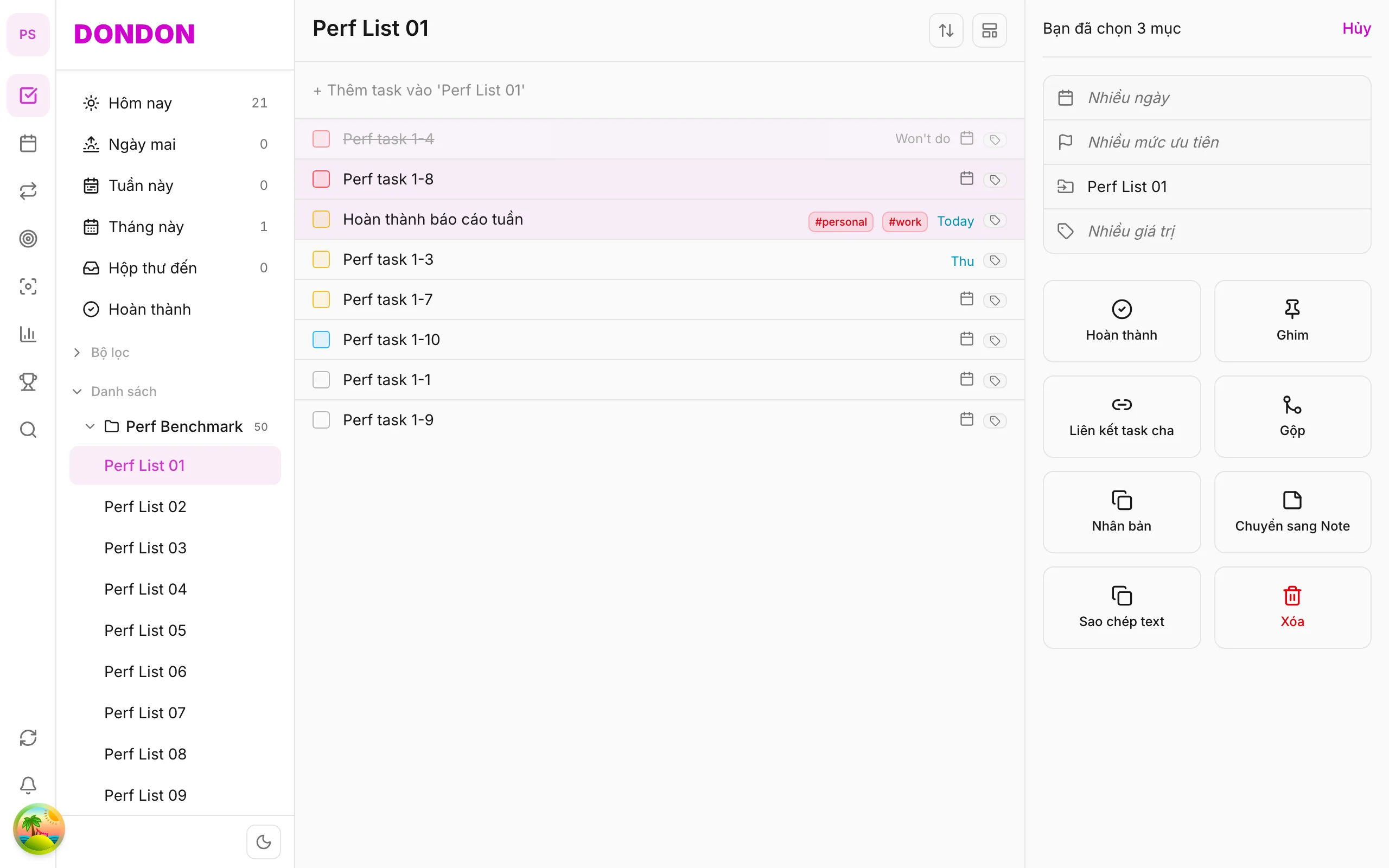
Merge duplicate tasks from bulk pane on web/desktop — not available on mobile yet.
On mobile: Task merge not available. Use Duplicate or edit description in Task detail.
What you'll learn (web/desktop)
- Select ≥ 2 tasks to merge
- Use Merge in bulk pane
- Pick survivor task
Before you start
| Platforms | Web · Desktop |
| Plan | Free |
Steps (web/desktop)
1. Select duplicates
⌘/Ctrl + click ≥ 2 tasks to combine.
2. Open bulk pane
Pane shows selection count on the right.
3. Tap Merge
Confirm dialog — pick task to keep.
4. Verify result
One task remains; others removed.
When merging helps
Duplicates appear when you capture the same idea twice: once from your phone during a commute and again at your desk, or when a quick-add and a typed task describe the same job. Left alone, they split your attention and inflate your list. Merging keeps one clean task instead of two half-finished ones.
A worked example
Imagine you have "Send invoice to Acme" in Inbox and "Invoice Acme for October" in Work. Select both with ⌘/Ctrl + click, open the bulk pane and choose Merge. In the dialog, pick the task you want to keep, usually the one with the better title, the right list and the correct due date. One task remains and the other is removed.
Common mistakes
- Merging the wrong pair. Check the selection count in the pane before you confirm.
- Keeping the wrong survivor. Pick the task that already has the right date and list, so you do not have to edit it afterwards.
- Expecting it on mobile. Merge is available on web and desktop only. On the phone, duplicate a task or edit its description in Task detail instead.
Quick checklist
- Select at least two tasks.
- Confirm the count in the bulk pane.
- Pick the survivor in the dialog.
- Verify that one task is left and that its date, list and tags are right.
Related guides
Try DonDon on your phone
Use the app for single tasks — merge coming to mobile. Sign up free.
Frequently asked questions
- Is merge on mobile?
- **Not yet** — web/desktop only. On mobile: [delete](/guides/delete-task/) extras or merge content manually in Task detail.
- Merge vs duplicate?
- Merge removes extras; duplicate creates copies.
- Subtasks when merging?
- Check preview — child relations may change.
Create a free account and start managing tasks today.
Smart task management — focus on what matters.
Create free account