best-of
Best Time Blocking Apps in 2026 (All Platforms)
Compare time blocking apps by platform and price: Sunsama, Akiflow, Motion, Morgen, Structured, TickTick and DonDon. Free options included.
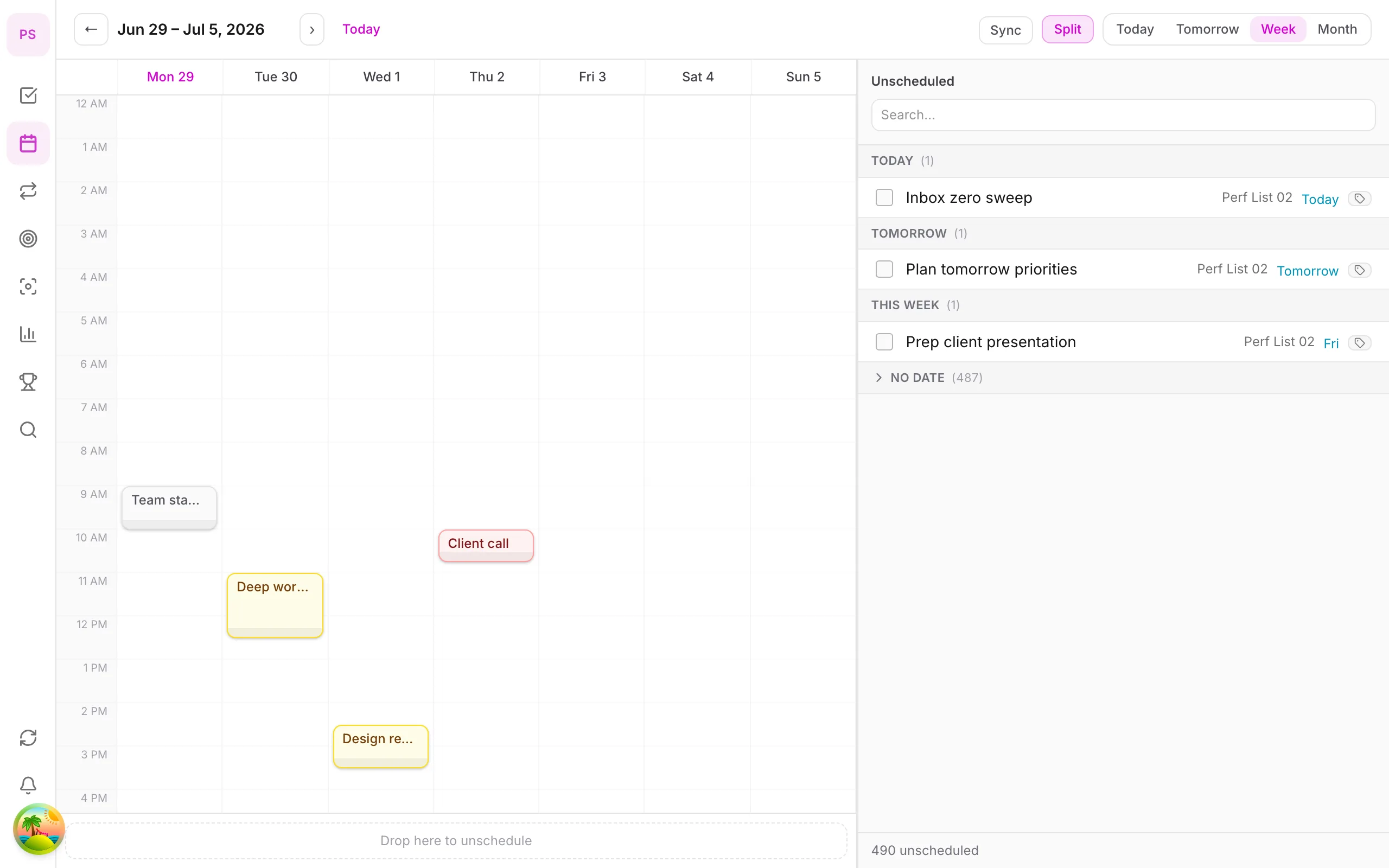
What time blocking apps need
Time blocking means putting tasks on a calendar as appointments with yourself. A good app lets you:
- Drag a task onto a time slot and resize its duration.
- See tasks and meetings together so you do not double-book.
- Roll unfinished blocks forward without rebuilding the day.
- Work on the devices you use (see below).
New to the method? Read the time blocking guide first.
Comparison by platform
| App | Windows | Mac | iOS | Android | Reported price |
|---|---|---|---|---|---|
| DonDon | Web + desktop | Web + desktop | Yes | Yes | Calendar/time blocking Premium: $1.99/mo or $11.99/yr |
| Sunsama | Web (+ desktop) | Yes | Yes | See vendor | Roughly $16–25/mo |
| Akiflow | Yes | Yes | Yes | See vendor | About $19/mo yearly, $34 monthly |
| Motion | Web | Web | Yes | Yes | Roughly $19–49/mo |
| Morgen | Yes | Yes | Yes | Yes | Pro about $15/mo yearly |
| Structured | See vendor | Yes | Yes | See vendor | Free; Pro roughly $10–20/yr |
| TickTick | Yes | Yes | Yes | Yes | About $36–50/yr |
Reported prices checked 2 November 2026 and differ by source and region; platform availability changes, so confirm on the vendor's site.
Choosing by situation
You live in meetings. Pick an app that merges calendar and tasks (Reclaim, Morgen, Akiflow).
You want a calm daily ritual. Sunsama is built around it, with no free tier.
You want tasks, habits and focus too. DonDon puts the calendar next to habits, goals and a Pomodoro timer. Time blocking and the calendar are Premium; tasks, habits and quick-add stay available on Free.
You think visually in a timeline. Structured.
Time blocking in DonDon
- Capture tasks with quick-add (
Write proposal tomorrow 10am). - Open the calendar (Premium) in day or week mode.
- Drag a task to a time slot and set its duration.
- Optionally ask your own AI model to propose blocks for the day. It is a suggestion you accept.
See the guides on calendar and time block and task time block.
Honest limits
DonDon does not auto-reschedule missed blocks in the background, and external calendar sync is limited to two accounts on Premium. If constant automatic re-planning matters most, look at Motion alternatives.
What separates a good time blocking app from a calendar
A calendar can hold blocks. A time blocking app should make creating and fixing them effortless. The features that matter in daily use:
- Drag from list to calendar. If you must retype the task, you will stop doing it.
- Duration estimates on tasks, so the block starts at the right length.
- Rollover. Unfinished blocks need to move forward without rebuilding the day.
- Conflict awareness. The app should show meetings next to tasks.
- Quick re-planning. Changing one block should not require rearranging five.
- Speed. Planning should take minutes, not become a project.
Matching the app to your day
Meeting-heavy day (more than 4 hours of calls). Blocks are mostly about defending gaps. A calendar-first tool with scheduling help (Reclaim, Morgen, Motion) saves effort.
Maker day (long stretches of focused work). You need a handful of big blocks and strong protection from interruptions. A simple tool is enough; focus tools such as a Pomodoro timer add structure inside each block.
Fragmented day (lots of small tasks). Group small tasks into themed blocks ("admin", "calls", "errands") instead of scheduling each one.
Student or shift worker. Fixed class or shift times first, then floating study blocks.
Setting up your first week
- Pick two block types: deep work and admin. Add more later.
- Set default durations: 90 minutes for deep work, 30 for admin.
- Protect your best hours: put deep work there before meetings claim them.
- Add a daily shutdown block (15 minutes) to review and plan tomorrow.
- Review on Friday: which blocks did you actually keep? Adjust durations accordingly.
Free vs paid reality
Most good time blocking apps are paid, because calendar integration and sync are costly to run. Strategies to stay free:
- Use Google Calendar for blocks and any free list app for tasks.
- Copy your top three tasks into the calendar each morning. It is manual but teaches you whether the habit sticks.
- Pay only once you notice the copying is the thing stopping you.
For DonDon, the calendar and time blocking are Premium ($1.99/month or $11.99/year), which keeps tasks, quick-add and habits free to start.
Features worth paying for, and ones that are not
Worth it for most people: drag-to-schedule, duration, calendar sync, reliable mobile apps.
Nice but optional: AI scheduling, team scheduling links, analytics dashboards, themes.
Often not worth it: features you cannot name a use for. If you have to ask what it does, leave it out of the decision.
A note on AI scheduling
AI can propose where tasks should go, but it cannot know your energy, your commute or the meeting you forgot to add. Treat proposals as a first draft. In DonDon the AI suggestion is something you accept or edit, and it runs on your own key or a local model. If you want a service that continuously rearranges your week without you asking, see Motion alternatives.
Common mistakes
- Starting with every task blocked. Start with the top three.
- No buffer. One overrun cascades.
- Blocking tasks too small. Batch tiny tasks together.
- Skipping the review. Without it, your estimates never improve.
Try it
Start free, upgrade only if you want the calendar: see pricing.
Frequently asked questions
- What is the best free time blocking app?
- Several apps offer limited free tiers. Reclaim has a free tier, Structured has a free app with paid Pro, and Google Calendar works for manual blocking. DonDon's calendar and time blocking are a Premium feature.
- Is there a time blocking app for Windows?
- Yes. Web-based apps such as Sunsama, Akiflow, Morgen and DonDon work in a browser on Windows, and several have desktop apps.
- Do I need AI for time blocking?
- No. AI can propose blocks, but the habit of putting tasks into specific time slots matters more than automation.
Create a free account and start managing tasks today.
Smart task management — focus on what matters.
Create free account