best-of
Desktop Pet Apps That Actually Make You More Productive
Do desktop pets help you focus? A look at how companion apps work, what the research-backed ideas are, and DonDon's ant companion for Windows and Mac.
Why pets show up in productivity apps
Apps such as Habitica and Finch popularised the idea that a character can make routines feel less like chores. A pet gives you three things a checkbox does not:
- A face for the reminder. A character telling you it is time is easier to accept than a system notification.
- A tiny emotional stake. You return because something is waiting for you.
- Ambient presence. It lives on screen, so the habit is visible without opening an app.
The caveat: a pet that is only decorative is a distraction. It has to be tied to real reminders and real habits.
Types of "productivity pets"
| Type | Examples | How it motivates |
|---|---|---|
| Gamified RPG | Habitica | Rewards and penalties for habits and to-dos |
| Self-care pet | Finch | You care for a pet by completing self-care tasks |
| Desktop companion | DonDon's ant | Floats on your desktop; reminders and pending habits |
| Pure toy | Many "desktop pet" apps | Fun, but not connected to your tasks |
Pricing and plans change; check each app. Finch Plus, for example, is reported around $40–70 per year depending on source and region.
DonDon's ant companion
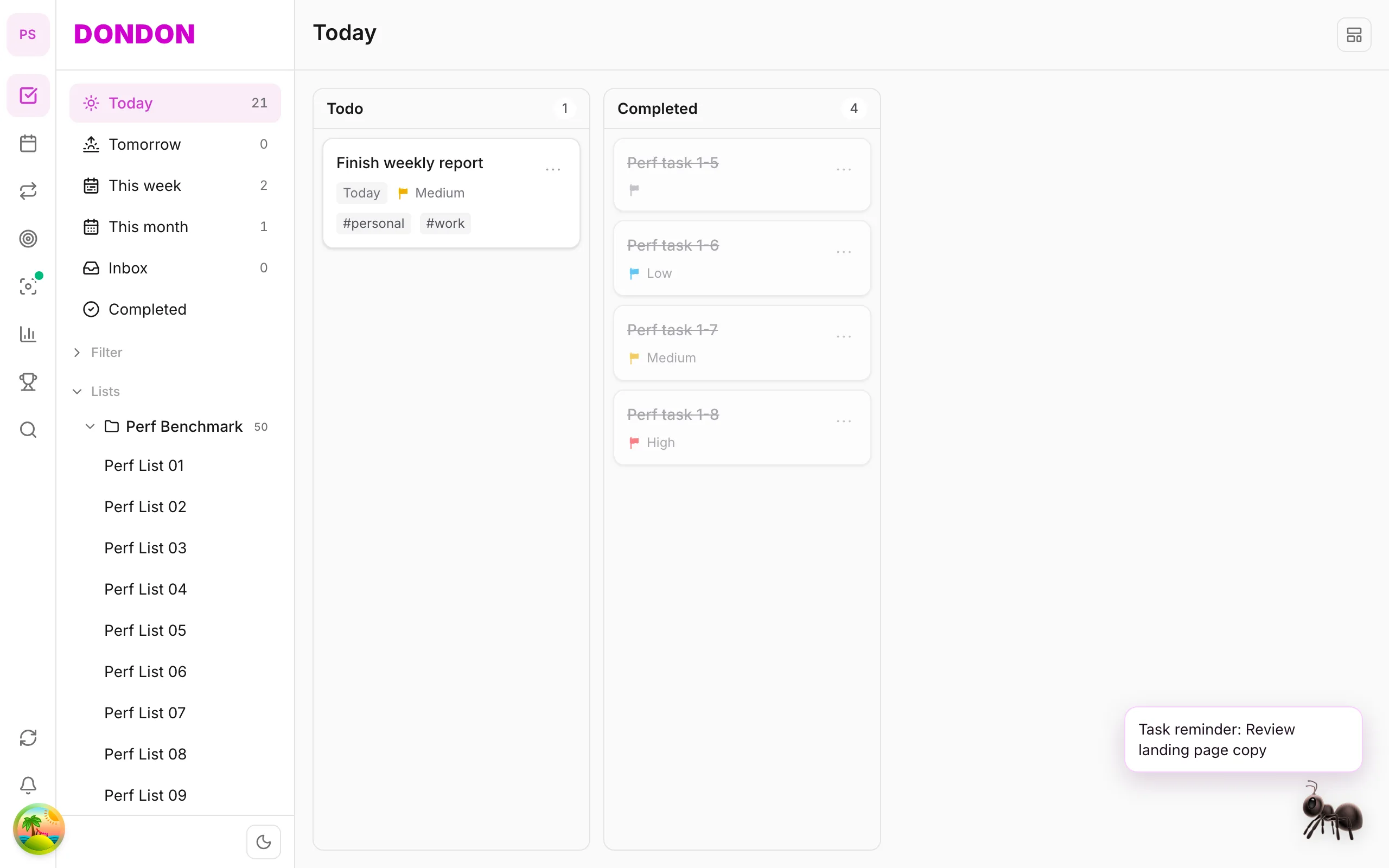
On the desktop app (Windows and Mac), DonDon can show a small ant companion that sits in a corner of your screen:
- It idles quietly and you can drag it to a different corner.
- When a reminder fires, it shows a speech bubble.
- Click it to see pending habits and jump into the main app.
- You can hide it any time.
The pet is a Premium feature ($1.99/month or $11.99/year). On mobile you find pet settings in Settings; see the pet companion guide.
Does it work? A fair view
There is no strong evidence that a pet makes you productive by itself. What helps is that it makes the cue to do a habit more visible. If you tend to ignore notifications, a character on screen can help. If you find it distracting, turn it off, because the core app works without it.
Tips if you try one:
- Link it to one or two habits, not ten.
- Keep reminders few and specific.
- Pair it with a focus method such as Pomodoro with a task list.
Honest limits
- The desktop pet is Premium only.
- It is a nudge layer, not a scheduling tool.
- Pets are not for everyone; some users find them gimmicky.
When a pet helps, and when it gets in the way
A desktop companion is a cue, not a method. It works when three conditions hold:
- It is attached to something real. A reminder for a habit you want to build, not an ambient animation.
- It is quiet most of the time. A pet that constantly demands attention becomes another notification.
- It is easy to turn off. If you cannot hide it quickly, you will resent it.
It gets in the way when you already struggle with distraction and a moving character on screen competes with your work. Be honest about which describes you.
What makes a good productivity companion
| Feature | Why it matters |
|---|---|
| Linked reminders | Turns the pet from decoration into a cue |
| Pending habits summary | Shows what is left without opening an app |
| Draggable and dockable | Lets you park it out of the way |
| Idle behaviour that is subtle | Avoids constant motion |
| Hide and show | Lets you work uninterrupted |
| Low resource use | A pet that slows your computer defeats the purpose |
DonDon's ant companion covers the first, second, third and fifth points: it shows reminder bubbles, lists pending habits when clicked, can be moved between screen corners and hidden. It is a Premium feature.
Setting up a companion to actually help
- Pick one habit to attach to the companion. Too many reminders becomes noise.
- Choose a time you would otherwise forget: a mid-morning walk, a stretch break, an end-of-day shutdown.
- Keep it in a corner you do not look at while concentrating.
- Turn it off during deep work if it distracts you. A pet is for the gaps, not the focus blocks.
- Review after two weeks. If you ignore it, remove it. If it helps, add one more habit.
Combining the pet with focus methods
The companion is best used between work sessions, not during them:
- Use a Pomodoro timer for focus, and let the companion nudge you at break time.
- Pair it with habit stacking so the reminder appears right after the anchor routine.
- Review habits in your weekly review to decide whether the nudges are working.
Other types of companions
Self-care pets (Finch). Designed around mood and self-care; you look after a pet by completing small tasks. Gentle, mobile-first.
RPG-style (Habitica). Your character levels up. Strong motivation for some, too much for others.
Pure toy desktop pets. Many small apps place a character on the screen. They can be charming but are rarely connected to your tasks, so they do not help productivity by themselves.
Privacy and performance
Check two things before installing any desktop companion:
- What it can see. A pet window should not need broad system access. Read the permissions.
- Resource use. An always-on animation should use very little CPU. Watch your system monitor for a day.
Honest summary
If you enjoy the idea, a companion can make a habit more visible and slightly more fun. If you do not, the rest of DonDon works without it. The pet is a small feature and should not be the reason to choose a planner; judge the planner on tasks, habits, goals and focus tools first.
Related
Habitica alternatives and best habit tracker + to-do apps. Download the desktop app from the platforms page.
Frequently asked questions
- Do desktop pets improve productivity?
- A pet is a nudge, not a method. It helps when it is connected to something real, such as reminders and habit check-ins, and distracts when it is purely decorative.
- Does DonDon have a desktop pet?
- Yes. DonDon's desktop app has an ant companion that floats on your screen, shows reminders, and lists your pending habits when you click it. The companion is a Premium feature.
- Is the desktop pet free?
- No. The pet companion is part of DonDon Premium ($1.99/month or $11.99/year).
Create a free account and start managing tasks today.
Smart task management — focus on what matters.
Create free account