comparison
Notion Habit Tracker vs a Dedicated App
Should you build a habit tracker and to-do list in Notion or use a dedicated app? Honest trade-offs on setup, mobile use, reminders, streaks and cost.
The honest question
Notion can do almost anything, so people build habit trackers and task managers in it. The real question is not "can it?" but "do you want to maintain it?"
What Notion does well
- Total flexibility. Databases, relations, templates, your layout.
- One workspace for notes, projects and tasks.
- Free to start, with plans reported from about $10 per member per month for paid tiers.
Where Notion struggles for habits
| Need | Notion | Dedicated app |
|---|---|---|
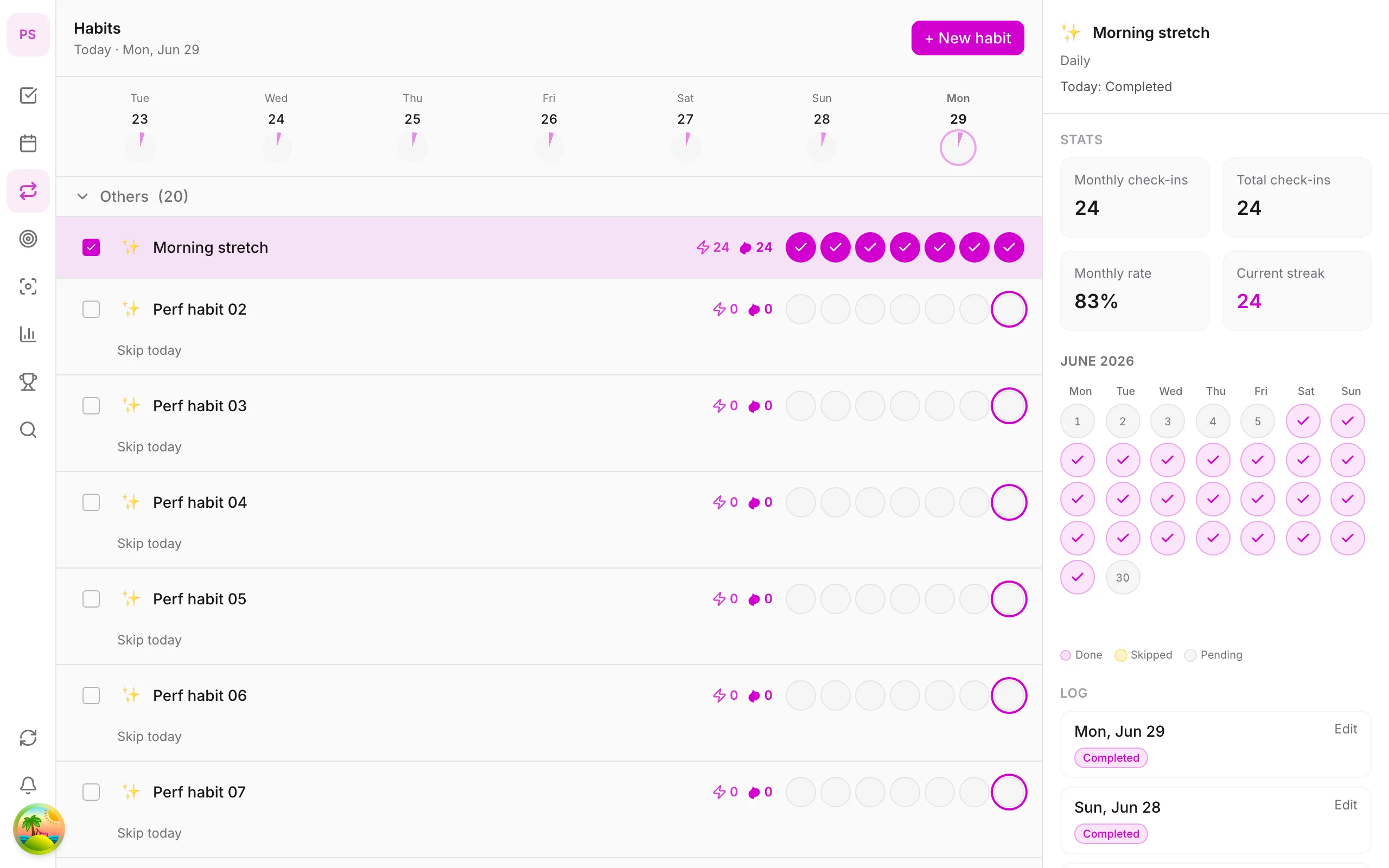
| Daily check-in speed | Open page, find row, tick box | Tap in the Today view |
| Reminders | Basic, per-page setup | Built in |
| Streaks and heatmap | Formulas you build | Built in |
| Mobile experience | Heavier | Designed for quick taps |
| Natural-language add | No | Yes in many apps |
| Maintenance | You | The vendor |
| Setup time | Hours | Minutes |
Pricing and features change; confirm on each vendor's page. Information checked 2 November 2026.
When Notion is the right choice
- You already live in Notion and enjoy designing systems.
- You want habits, projects, notes and journals in one database.
- You are happy to fix a formula when it breaks.
When a dedicated app is better
- You want the habit to take five seconds, every day.
- You need reminders that just work.
- You want streaks, a heatmap and stats without building them.
- You use your phone more than your laptop.
Dedicated options
| App | Notes |
|---|---|
| DonDon | Tasks, habits, goals, Pomodoro, optional AI; Free includes one habit, Premium up to 50 |
| TickTick | All-in-one with habits and Pomodoro |
| Habitica | Gamified; see Habitica alternatives |
| Todoist | Tasks only, no dedicated habit tracker |
Using both
A common pattern: Notion for notes, plans and reference; a task and habit app for daily execution. Keep a link from your Notion plan to the app, and review both in your weekly review.
DonDon's take
DonDon is a planner rather than a workspace builder. Habits show in the Today view beside tasks, each habit has a calendar heatmap, and the Free plan includes one habit, which is enough to test the method. Premium ($1.99/month or $11.99/year) allows up to 50 habits, month and year goals, a calendar and more.
Where Notion beats DonDon: infinite flexibility, databases and collaboration. DonDon has no list sharing or team features today.
See the habit tracker guide, best habit tracker + to-do apps and TickTick alternatives.
What a Notion habit tracker really involves
Building one is not hard, but it has more parts than people expect.
- A habits database with one row per habit.
- A log database with one row per day or check-in, related to the habit.
- Properties for date, done status and notes.
- Formulas or rollups to calculate streaks and completion rates.
- Views: a Today view, a weekly grid and perhaps a calendar.
- A mobile layout that is quick to use on a phone.
- Reminders, which usually require extra setup.
Many templates exist, and they save time. But every customisation, such as changing how streaks reset, means editing formulas. That is the hidden cost: maintenance.
The five-second test
The most important property of a habit tracker is how quickly you can record a check-in. Test it:
- Pick up your phone.
- Time how long it takes to open the app and record today's habit.
- Do this on a day you feel tired.
If it takes more than about ten seconds, the friction will win eventually. Dedicated apps put the check-in on the first screen; Notion pages tend to need more taps and loading.
Hybrid approaches that work
You do not have to choose.
- Notion as the "why". Keep your goals, reflections and weekly reviews in Notion, where long-form writing is pleasant.
- A habit app as the "doing". Use a dedicated app for the daily check-in and reminders.
- Link them. Put a link from your goal page to the habit app, and review both weekly.
This gives you flexibility where you want it and speed where you need it.
Features that dedicated apps handle for you
- Reminders at a specific time, with snooze.
- Streaks with sensible rules for skipped days.
- A heatmap that shows consistency over months.
- A Today view combining habits and tasks.
- Sync and offline support on mobile.
- Statistics without formulas.
If you do not enjoy building systems, these save hours.
Features Notion handles better
- Combining habits with notes, journals and project pages.
- Custom properties for anything you want to track.
- Sharing a workspace with others.
- Embedding data in a larger dashboard.
If those matter, Notion is hard to beat.
Cost comparison
Notion's free plan is generous for personal use; paid plans are reported from about $10 per member per month. A dedicated app's free tier is usually enough to try; paid tiers vary. In DonDon, Premium is $1.99 a month or $11.99 a year. The more important cost is time: building and maintaining a tracker can cost hours, while a dedicated app costs minutes.
A sensible way to decide
- List the three things you want from a habit tracker.
- Check whether a dedicated app does them out of the box.
- If yes, use it for a month.
- If you find yourself missing flexibility, build the extra in Notion, then link the two.
Starting simple is easier to undo than starting complex. See Habitica alternatives if you want game elements, and habit stacking examples for what to track.
Decision rule
If building your system sounds fun, use Notion. If it sounds like a chore that will end your habit before it starts, use a dedicated app and keep Notion for notes. Compare plans on pricing.
Frequently asked questions
- Can Notion be a habit tracker?
- Yes. With a database and a few properties you can build habit tracking, but you set up and maintain the formulas, views and any streak logic yourself.
- Is Notion free for personal use?
- Notion has a free plan with usage limits, and paid plans reported from about $10 per member per month. Check notion.com/pricing for current details.
- When is a dedicated habit app better?
- When you want fast daily check-ins, reminders and streaks that work out of the box, especially on mobile.
Create a free account and start managing tasks today.
Smart task management — focus on what matters.
Create free account