how-to
Personal Kanban for Tasks: A Simple Board That Works
How to use a personal Kanban board to manage tasks: columns, WIP limits, a starter template, and when a board beats a list.
Board or list?
A list answers "what do I have?". A board answers "where is each thing right now?" That matters when work moves through stages: a blog post goes from idea to draft to edit to published; a job application from found to applied to interview.
Use a list for independent errands. Use a board for multi-stage work.
The simplest board
Start with three columns:
| To do | Doing (limit 3) | Done |
|---|---|---|
| Next actions you plan to do | What you are working on now | Finished this week |
Each task is a card. You move it right as it progresses.
The one rule that makes it work: limit work in progress
Kanban's key idea is a WIP limit. If "Doing" is capped at three, you cannot pull another card until you finish one. That fights multitasking and forces you to finish.
Add columns only when you need them
Useful variations:
- Waiting: blocked on someone else.
- Review: needs a second look before done.
- Someday: parked ideas, off the active board.
Keep it under five columns.
Weekly rhythm
- Monday: pull this week's cards into To do.
- Daily: move one to Doing, finish it, repeat.
- Friday: archive Done, clear Waiting, run your weekly review.
A starter template
BACKLOG (ideas) -> THIS WEEK -> DOING (max 3) -> WAITING -> DONEKanban vs other methods
- Eisenhower matrix sorts by urgent and important; Kanban shows status. Use both: see the Eisenhower matrix guide.
- Time blocking puts tasks on a calendar; Kanban tells you what to put there. See the time blocking guide.
Kanban in DonDon
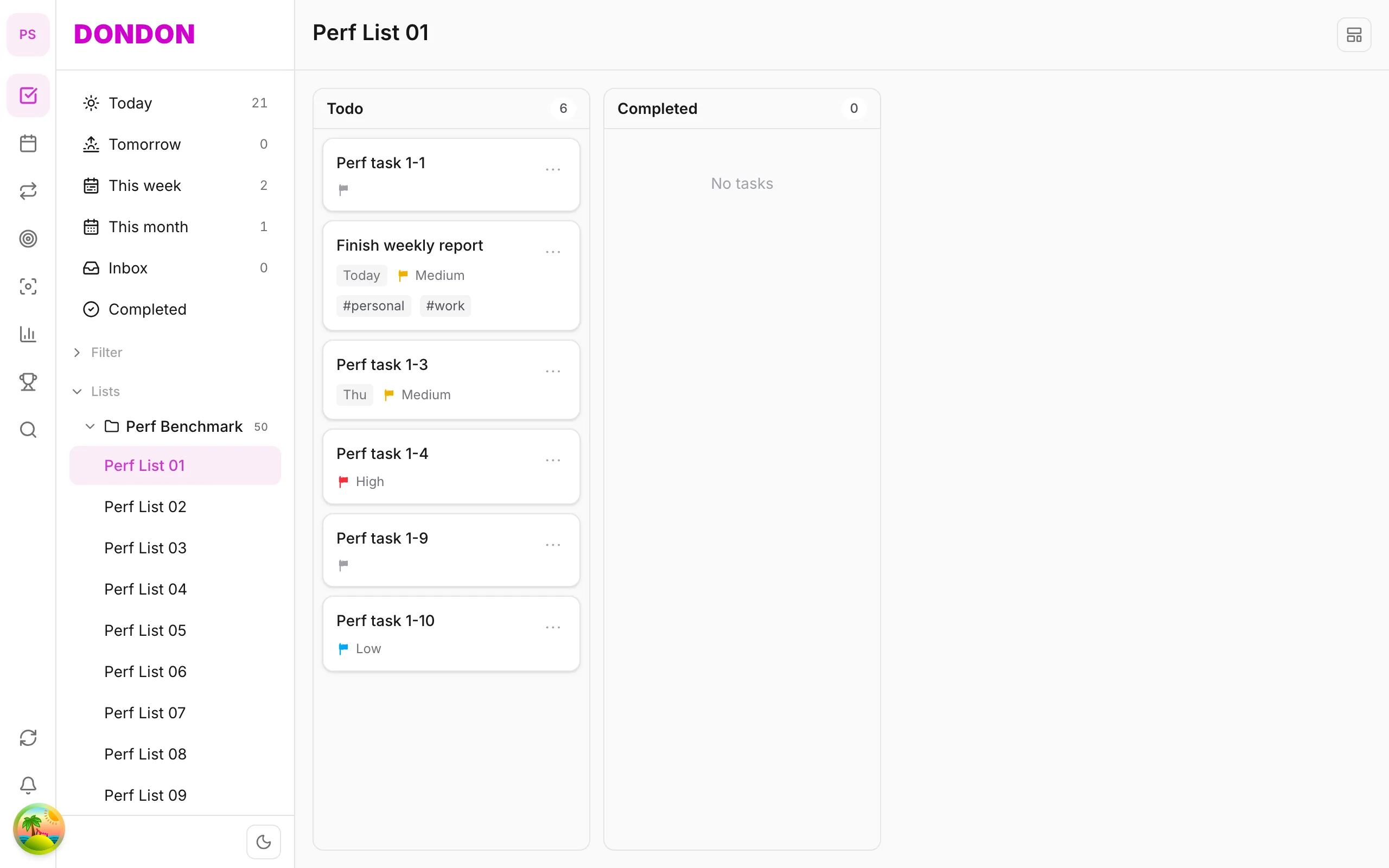
DonDon lets you switch a list between List, Kanban and Timeline views, and there is also an Eisenhower Matrix view. These advanced task views are Premium ($1.99/month or $11.99/year); the Free plan uses the list view.
- Drag cards between columns.
- Tasks keep their priority, due date and tags across views.
- Combine with the calendar and Pomodoro timer to work the Doing column.
If you only need a simple board and want to stay free, a paper board or a free tool works fine for a week. See the guide on tasks and lists and pricing.
Example boards for common situations
A board is just columns that match how your work actually moves. Here are examples.
Freelance writer.
| Ideas | Drafting | Editing | Sent | Paid |
|---|
Job search.
| Found | Applied | Interview | Offer | Closed |
|---|
Home projects.
| Wish list | Planned | In progress (max 2) | Done |
|---|
Student essay.
| To research | Outlining | Writing | Revising | Submitted |
|---|
Notice that columns describe stages, not categories. A column called "Work" tells you nothing; "Waiting on client" does.
How to set a WIP limit
The work-in-progress limit is the engine of Kanban. To choose yours:
- Count how many things you really have time to progress at once. For most people it is one to three.
- Set that as the limit on the "Doing" column.
- When the column is full, finish something before starting something new.
- If you routinely hit the limit and stay stuck, one of your cards is blocked. Move it to "Waiting" and investigate.
It feels restrictive at first. That is the point: it shows you where you are overcommitted.
Reading your board
A board is also a diagnostic tool:
- Cards pile up in "Doing". Too much parallel work. Lower the limit.
- Cards sit in "Waiting". You depend on others. Follow up or reroute.
- "To do" grows endlessly. You are capturing faster than finishing. Prune or move items to Someday.
- "Done" is empty. Tasks are too large. Break them into smaller cards.
Combining a board with a calendar
A board shows status; a calendar shows time. Use both:
- Pick cards for this week and move them to the top of "To do".
- Block time for the cards you will do tomorrow. See the time blocking guide.
- Use a focus session for each card; see Pomodoro with a task list.
Making the board stick
- Review daily for two minutes: move one card, check Waiting.
- Archive Done weekly so the board stays small.
- Limit columns to what you will actually use.
- Keep cards short. A verb and an object: "Draft intro", "Email supplier".
- Do a weekly review to catch stale cards; see the weekly review template.
Digital or paper?
Paper or whiteboard. Physical, visible and satisfying to move cards. Good at a desk.
Digital. Available everywhere, easy to search and reorder. Good if you work across devices.
Many people try paper first for a week, then move to an app once they know they like the method.
Quick checklist
- Three columns to start
- A limit on Doing
- A weekly archive of Done
- A short daily check
- One card per concrete next action
When not to use Kanban
- For a short list of independent errands a board adds overhead.
- If you never review it, it becomes a graveyard of cards.
- For tasks that depend on clock time rather than status, use a calendar.
Frequently asked questions
- What is personal Kanban?
- A visual board of columns (such as To do, Doing and Done) where each task is a card that moves across as you work, with a limit on how many cards can be in progress.
- How many tasks should be in Doing?
- One to three. The limit on work in progress is the point of Kanban: it stops you starting everything and finishing nothing.
- Is the Kanban view free in DonDon?
- No. DonDon's advanced task views (Kanban, Matrix and Timeline) are part of Premium.
Create a free account and start managing tasks today.
Smart task management — focus on what matters.
Create free account